DEEPSOUND R5 Product Manual
- Hardware Version: v1.0.0
- Manual Version: v1.0
- Release Date: 2026-04-30
- Last Updated: 2026-04-30
- Author: SEONGSANLAB Co., Ltd.
PART I: Safety and Maintenance
1.1 Safety Information
- High-Performance Remote System: DEEPSOUND R5 is a high-performance remote-controlled PAUT device optimized for automated inline inspections and precision laboratory environments.
- Stable Power and Connectivity: Since this device is controlled in real time by an external host PC via a gigabit network, ensure stable physical connections for both power and LAN communication cables.
- Ventilation and Heat Dissipation: Due to the ultra-slim 42mm form factor, ensure sufficient space around the unit and keep side ventilation ports unblocked for optimal thermal management.
- Dedicated Power Supply: To protect internal circuits, strictly use the provided 12V DC power adapter. Non-standard power supplies may cause severe hardware damage.
- Connector Protection: Never disconnect PAUT high-density connectors or UT probe terminals while data acquisition is active.
1.2 Maintenance of the Device
- Operating Environment: Recommended operating temperature is 0°C to 60°C. Avoid extreme humidity or condensation.
- Storage Environment: Store within -20°C to 80°C in a flat, stable, and vibration-free location away from direct sunlight.
- Network Security: To ensure uninterrupted real-time data streaming, avoid mixing with unverified external network traffic.
- Terminal Inspection: Periodically inspect connector pins on input/output ports for bending, contamination, or debris.
1.3 Cleaning Guide
- Housing Cleaning: Clean the outer aluminum and plastic housing using a soft, dry, lint-free cloth. Do not use chemical solvents or abrasive agents.
- Port Management: Keep dust caps securely attached to PAUT high-density connectors and BNC ports when not in use.
PART II: Product Overview
2.1 Introduction to DEEPSOUND R5
- 32:128PR High-Performance Unit: DEEPSOUND R5 delivers powerful 32:128PR Phased Array performance in a compact, remote/rack-mountable unit.
- Seamless Automation Integration: Designed without an integrated screen for maximum compactness, it performs real-time data streaming and advanced analysis via PC software, making it ideal for integration with scanners and automated inspection lines.
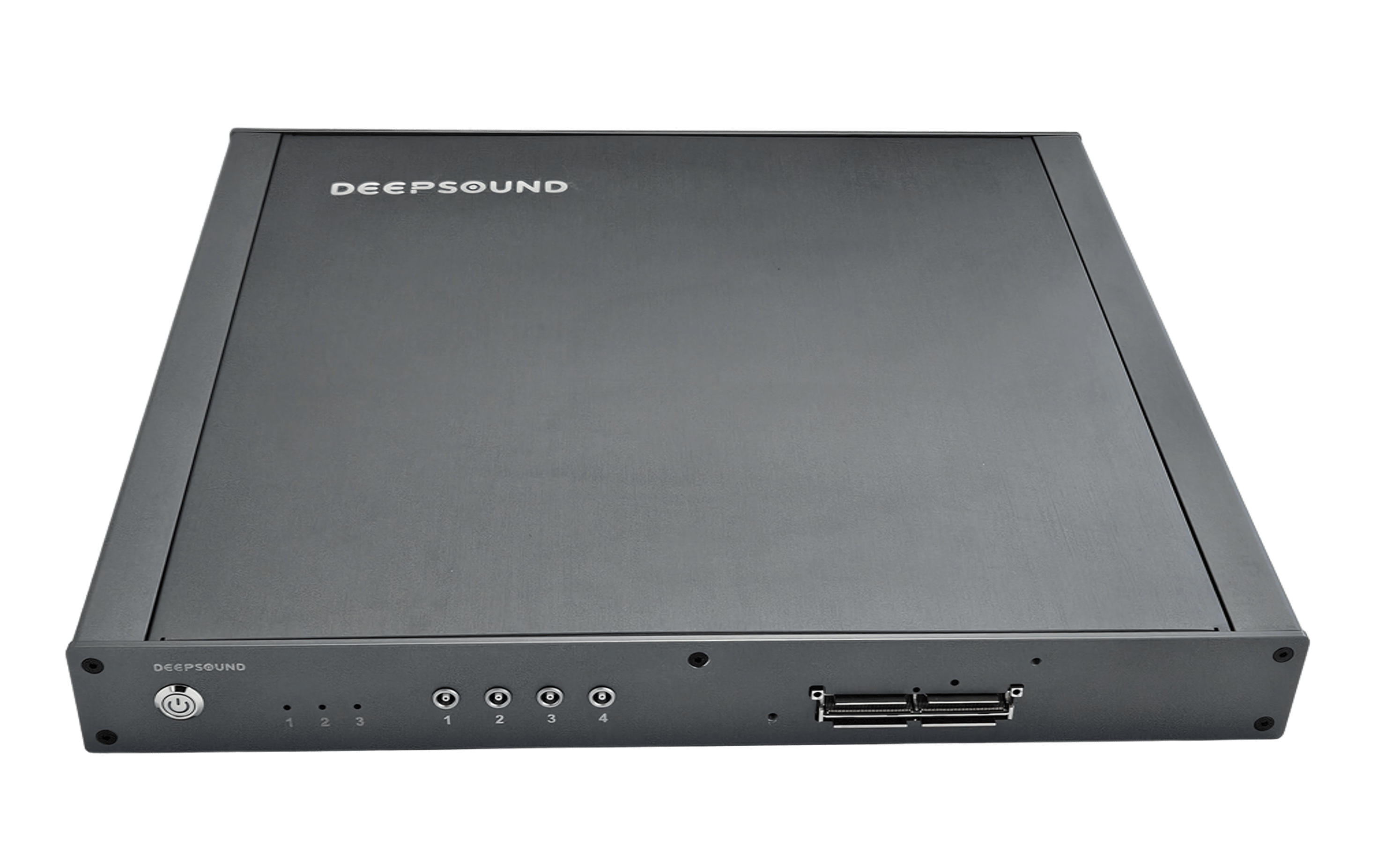
DEEPSOUND R5 Product Overview (Remote Unit with Case)
2.2 Hardware Characteristics
- Gigabit LAN Remote Control: High-speed Gigabit Ethernet (LAN) connectivity provides zero-latency transmission of large raw ultrasonic data streams.
- Simultaneous Multi-Channel Support: Supports 32:128PR Phased Array along with 4 independent Conventional UT channels for comprehensive multi-mode testing in a single unit.
- Ultra-Slim 42mm Form Factor: The 42mm ultra-slim aluminum profile maximizes space efficiency in 19-inch server racks or compact field enclosures.
- Versatile Hardware Scalability: Built-in multi-axis encoder inputs and external I/O interfaces allow seamless integration with various automated scanners and robotics.
PART III: Hardware Interface
3.1 Device Layout and Parts
- The DEEPSOUND R5 interface is engineered around intuitive status indication and robust industrial connectivity.
3.1.1 Front Panel
- Power Button: Industrial physical push-button to control system power.
- Status LEDs (1-3): Real-time status indicators for Power, Network Communication (LAN), and Data Acquisition.
- UT Ports (1-4): 4 dedicated ports for Conventional UT / TOFD probe connections.
- PAUT Port: High-density IPEX interface for 32:128PR Phased Array probe connection.
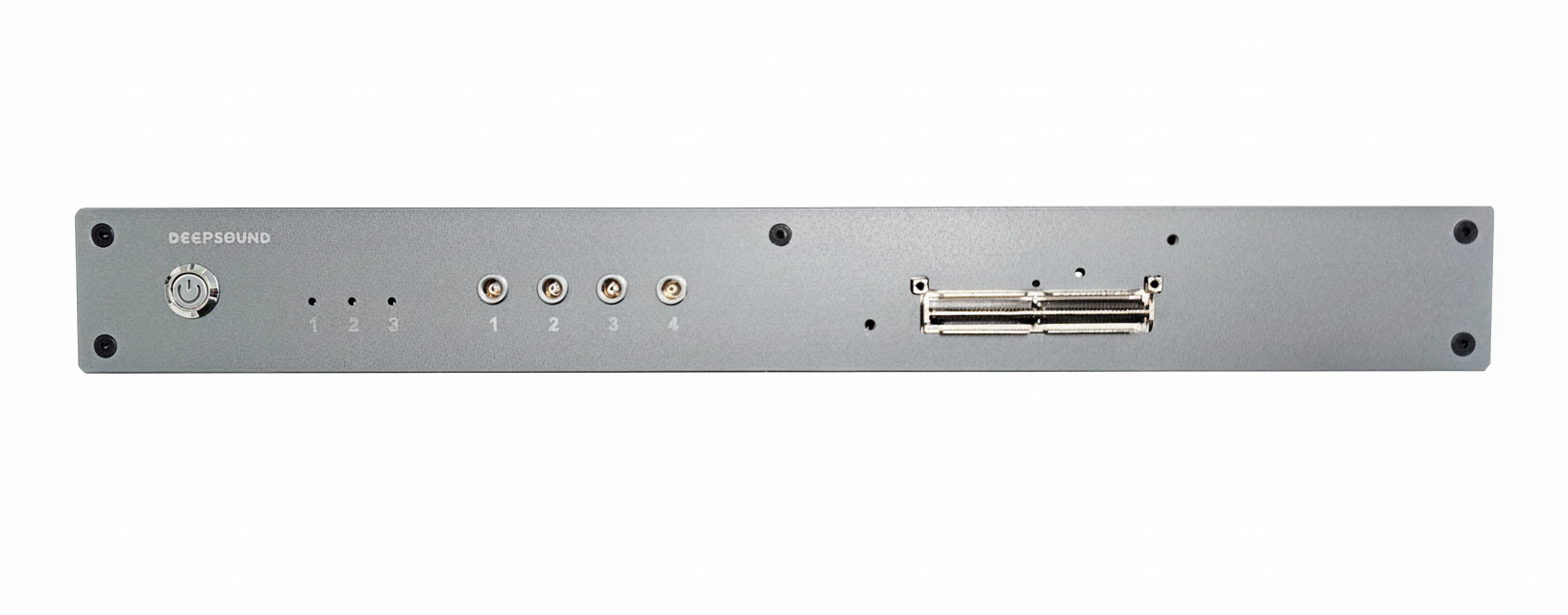
DEEPSOUND R5 Front Interface Details
3.1.2 Connectivity (Rear/Side)
- Gigabit LAN Port: High-speed RJ-45 port for real-time PC-device communication.
- USB 3.0 Port: High-speed interface for data backup, firmware updates, and peripheral connections.
- HDMI Port: High-definition video output for external displays and status monitoring.
- DC Power Inlet: Dedicated DC 12V power supply connector.
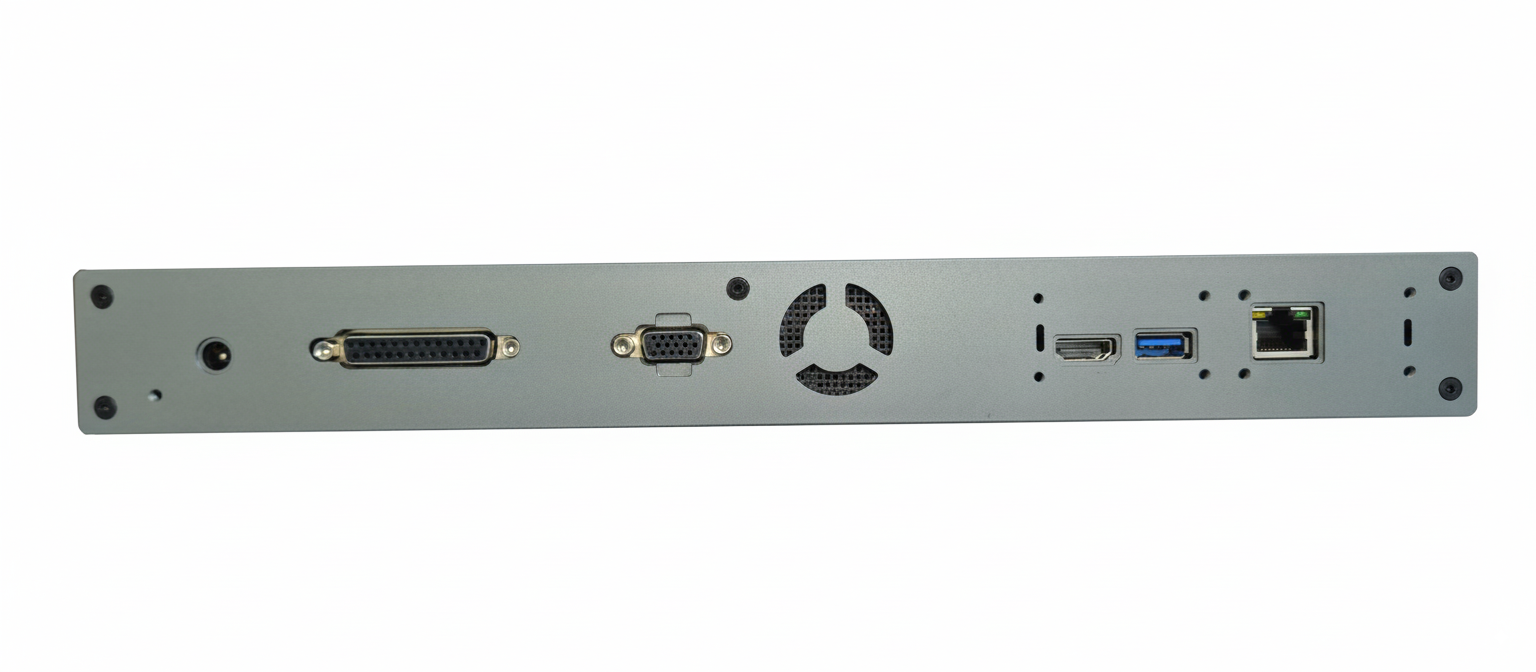
DEEPSOUND R5 Status & Connection Indicators
PART IV: Preparation for Use
4.1 PC Connection Setup
- Network IP Configuration: Connect the R5 unit to the control PC using a Cat.6+ LAN cable, then set the PC’s IPv4 network to the static IP range specified in the manual.
- Software Initialization: Launch the dedicated software (DSVision / DSK) on the PC to verify real-time handshake and device recognition.
4.2 Power Management
- Power Application: Connect the dedicated DC 12V adapter and press the front power button.
- Boot Verification: Check that front status LEDs (1-3) illuminate properly to confirm system Ready state.
PART V: External Connections
5.1 Probe Connections
- PAUT Probe: Align the 128ch high-density connector horizontally into the PAUT port and secure the locking latch firmly.
- UT Probe: Connect Conventional UT or TOFD probes to channels 1-4 as required.
5.2 Synchronization
- Encoder Synchronization: When using automated scanners, connect the encoder cable to synchronize physical movement distance with ultrasonic pulses in real time.
PART VI: Device Specifications
6.1 General Specifications
- Dimensions (W x H x D): 349 x 310 x 42 mm (With Case)
- Weight: 1.2 kg (Ultra-lightweight design)
- Power Supply: DC 12 V (External dedicated adapter)
- PC Communication: Gigabit Ethernet (1000BASE-T LAN)
- Video Output: HDMI x 1
6.2 Phased-Array Specifications
- PAUT Channel: 32:128PR (Controls up to 128 elements)
- Scan Type: Linear, Sectorial, Conventional, TOFD
- Focal Law: Unlimited (Software calculation)
- Focusing Mode: True-depth, Sound path
- Channel Group: Up to 8 independent groups simultaneously
6.3 Acoustic & Data Specifications
- Pulser (Voltage): 25 V ~ 160 V (5 V Step variable control)
- Pulser (Pulse Shape): Bipolar Pulse (High-sensitivity bipolar pulse)
- Pulser (Pulse Width): 50 ns ~ 2,000 ns
- Receiver (Gain Range): 0 dB ~ 90 dB (0.1 dB precision)
- Receiver (Band Width): 0.5 MHz ~ 20 MHz
- Receiver (Sample Resolution): 16-bit high-resolution A/D conversion
- A-scan Data Point: Up to 16,384 Points
PART VII: Troubleshooting
7.1 Basic Troubleshooting
- Network Communication Error: Verify LAN cable connection and host PC static IP configuration.
- Power Failure: Check 12V power adapter connection, wall outlet power, and front LED indicators.
- Data Transfer Latency: Check network bandwidth and terminate background applications that consume excessive network resources.
7.2 Support
- Manufacturer: SEONGSANLAB Co., Ltd.
- Contact: +82-2-2039-5725 / admin@dspaut.com